
YouTube is the second largest search engine in the world. It is also one of the most competitive.
The difference between a video that gets 100 views and one that gets 100,000 often comes down to one thing: keyword targeting. If you optimize for what people are actually searching for, YouTube will surface your video to the right audience. If you guess, you are gambling on the algorithm.
A free YouTube keyword tool helps you remove the guesswork. Here is how to find the right keywords for your videos, the best free tools to use, and a workflow that works whether you are just starting out or already publishing regularly.
Why YouTube Keyword Research Matters
YouTube's search algorithm works similarly to Google's. It looks at the title, description, tags, and watch time signals to determine which videos to rank for which queries.
Without keyword research, you are producing content in a vacuum. You might make a great video, but if no one searches for the topic you chose, the video will not get found.
Good YouTube keyword research helps you:
- Find topics with real search demand before you invest production time
- Identify low-competition keywords where your video can actually rank
- Optimize your metadata with the exact phrases viewers use
- Understand what viewers want from the language they use to search
The Best Free YouTube Keyword Tools
1. ShuttleSEO — YouTube Autocomplete + Search Volume
ShuttleSEO expands a seed keyword across YouTube autocomplete suggestions and shows search volume, CPC, and competition data.
The YouTube source is particularly useful because it surfaces the exact phrasing that YouTube users type into the platform, which often differs from Google search behavior.
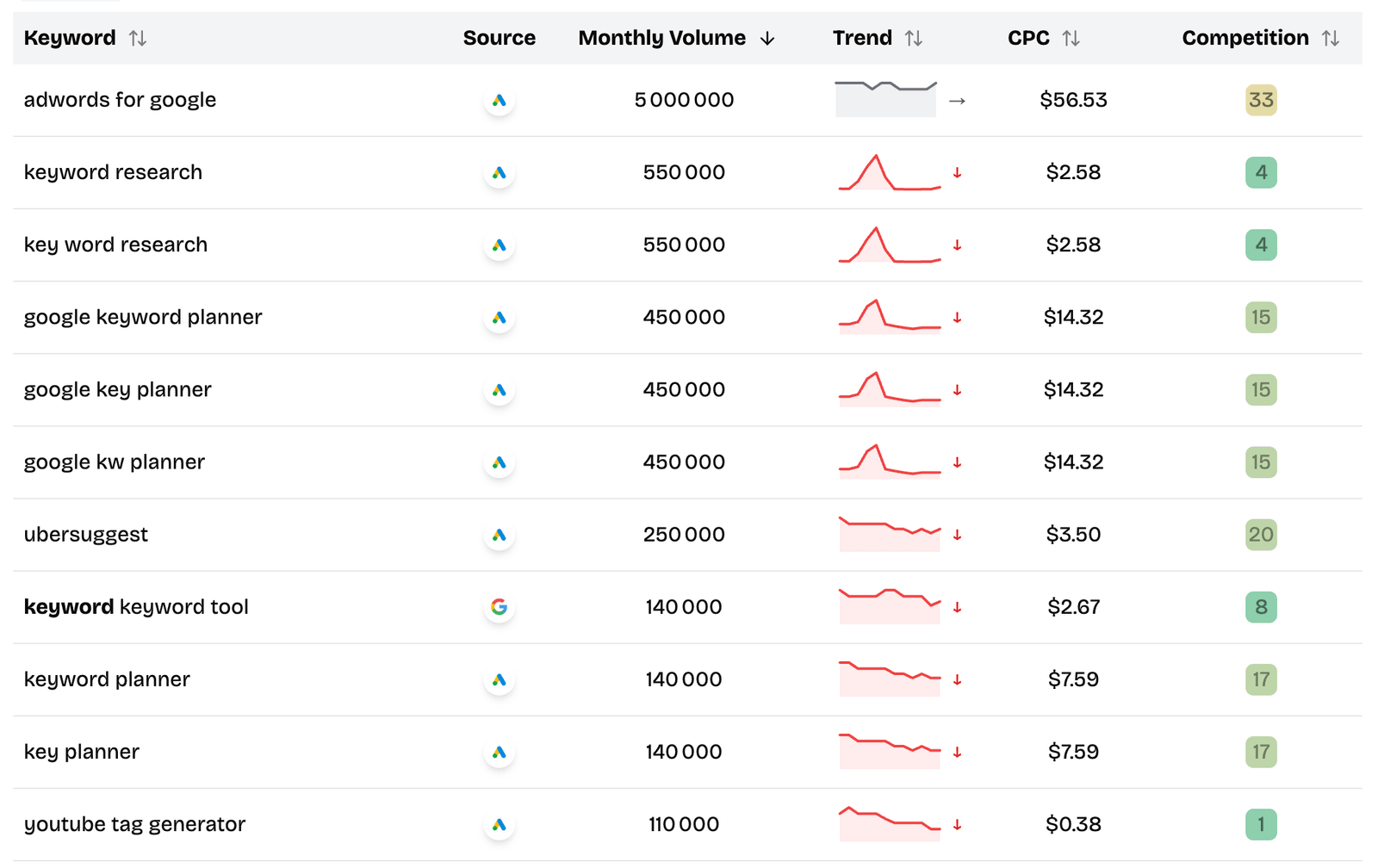
How to use it:
- Enter your seed keyword
- Select YouTube as the source
- Browse the autocomplete suggestions and filter by volume
- Look for keywords with clear intent and measurable demand
Best for: YouTube-specific keyword discovery, finding long-tail variations, validating search demand.
2. YouTube Search Suggestions
YouTube's own autocomplete is a free and immediate keyword source. Start typing in the YouTube search bar and watch the suggestions change as you add more characters.
How to use it:
- Type your main keyword into YouTube search
- Note the autocomplete suggestions
- Add a letter or modifier and note how the suggestions change
- Repeat for different combinations
This is manual but effective for quick validation. The suggestions YouTube shows are based on real user search behavior on the platform.
Best for: Quick manual checks, understanding YouTube-specific phrasing.
3. YouTube Search Results (For Competition Analysis)
When you search a keyword on YouTube, the results tell you a lot about competition. Look at the top-ranking videos and ask:
- How many views do they have?
- How recent are they?
- Are they from established channels or smaller creators?
- Is the video quality high or could you do better?
If the top results have millions of views from channels with hundreds of thousands of subscribers, competition is high. If the top results have a few thousand views from smaller channels, there is an opening.
Best for: Validating whether a keyword is realistically targetable.
4. Google Trends (YouTube Search Filter)
Google Trends lets you filter specifically for YouTube search data. This helps you see whether interest in a topic is rising, falling, or seasonal on YouTube specifically.
How to use it:
- Go to Google Trends
- Enter your keyword
- Change the search filter to "YouTube Search"
- Look at the interest over time and related queries
Best for: Timing your content for seasonal trends and validating topic direction.
5. VidIQ or TubeBuddy Free Plans
VidIQ and TubeBuddy are YouTube-specific optimization tools with free plans that include keyword search volume estimates and competition scores. The free versions are limited but give you directional data without paying.
Best for: YouTube-native keyword scoring and tag suggestions.
How to Find YouTube Keywords: Step by Step
Step 1: Brainstorm Seed Keywords
Start with topics your audience cares about. Think about the problems they search for, the questions they ask, and the content they engage with.
A few seeds for a fitness channel example:
- "home workouts"
- "weight loss tips"
- "beginner yoga"
- "meal prep"
Step 2: Expand With Autocomplete
Use ShuttleSEO or YouTube's own search bar to expand each seed into specific long-tail variations.
Seed: "home workouts"
YouTube autocomplete suggestions:
- home workouts for beginners
- home workouts for weight loss
- home workouts no equipment
- home workouts for men
- home workouts for women over 50
Each of these is a potential video topic with clear audience targeting.
Step 3: Check Search Demand
Not every autocomplete suggestion has enough search volume to justify a video. Use ShuttleSEO or VidIQ's free plan to check whether people are actually searching for the keywords you found.
Focus on keywords where:
- Volume exists (even 100-500 searches per month can be worth it for a targeted video)
- The intent matches your content style
- You can create a video that serves the query better than what currently ranks
Step 4: Analyze the Competition
Search each candidate keyword on YouTube. Look at the top 5-10 results.
Good signs:
- Top videos have low views (under 10K)
- Top videos are old or outdated
- Top videos are from small channels
- No video directly answers the query well
Bad signs:
- Top videos have millions of views
- Top channels dominate multiple results
- Recent high-quality videos from established creators
Step 5: Optimize Your Video
Once you have chosen a keyword, optimize your video metadata:
Title: Include the exact keyword naturally. Make it compelling enough to click.
Description: Write a detailed description that includes the keyword and related variations. YouTube reads this to understand what your video is about.
Tags: Include the main keyword, variations, and related terms.
Thumbnails: Thumbnails are not keyword-related but they significantly impact CTR, which affects ranking. Invest time here.
YouTube Keyword Strategy Tips
Target Long-Tail Keywords First
Broad keywords like "fitness" or "cooking" are extremely competitive on YouTube. Long-tail variations like "15 minute full body workout no equipment" or "one pot pasta recipes for beginners" are easier to rank for and attract more targeted viewers.
Look for Search Gaps
A search gap is a query where the top results do not fully satisfy the intent. For example, if people search "how to start a YouTube channel in 2025" and the top results are from 2022 or earlier, there is a gap you can fill with a fresh, up-to-date video.
Use Question Keywords
Question-based keywords like "how to," "what is," "why does," and "can you" often have lower competition and clear search intent. They are also great for appearing in YouTube's suggested videos and Google's featured snippets.
Build Keyword Clusters
Do not target one keyword per video. Aim to target a cluster of related keywords with a single comprehensive video. This increases your surface area for search discovery.
For example, a video targeting "beginner yoga for flexibility" could also rank for:
- "yoga for beginners morning"
- "flexibility exercises for beginners"
- "easy yoga stretches for tight muscles"
- "yoga for stiff joints"
Common YouTube Keyword Mistakes
Mistake 1: Keyword Stuffing Titles
Packing your title with keywords makes it look spammy and reduces click-through rate. Write for humans first, keywords second.
Mistake 2: Ignoring Search Intent
A keyword like "how to edit videos" could mean different things:
- Beginner wants basic cutting
- Intermediate wants color grading
- Advanced wants VFX
Make sure your video matches what the searcher expects.
Mistake 3: Chasing High Volume Only
A keyword with 50,000 searches but ranking pages from channels with millions of subscribers is not a realistic target. A keyword with 500 searches and weak competition is a better bet.
Mistake 4: Forgetting Google Search
YouTube videos also rank in Google search results. Optimizing for Google's search behavior as well as YouTube's can double your discovery potential.
Final Take
The best free YouTube keyword tool is the one you actually use in your workflow.
Start with autocomplete to find the real phrases people search. Validate with volume data to confirm demand. Check the competition to know whether your video can realistically rank. Then optimize your metadata and make a video that serves the query better than what currently exists.
If you do that consistently, you will outperform most creators who publish without research and hope the algorithm finds them.
Related Articles
- How to Scrape Google Autocomplete for Keyword Research - The same autocomplete approach works for YouTube keyword discovery.
- Best Free Long Tail Keyword Finder Tools: The Ones I Would Actually Use - A broader look at keyword research tools across multiple platforms.
- Best Free Search Volume Checkers - How to validate search demand across Google and YouTube.